
The finishing chapter · 105
Choose the file.
Then the formatter.
A practical guide to commissioning a readable ebook and a considered printed page. Decide what to buy, write a usable brief, and know what to check when the files arrive.
The most useful question before hiring a formatter is not “Which font looks best?” It is “What must the delivered book do?” A novel on a phone must adapt to the reader. A paperback must hold its composition on a fixed sheet. The same manuscript can need two different production jobs.
Study the page
Same words. Different reading conditions.
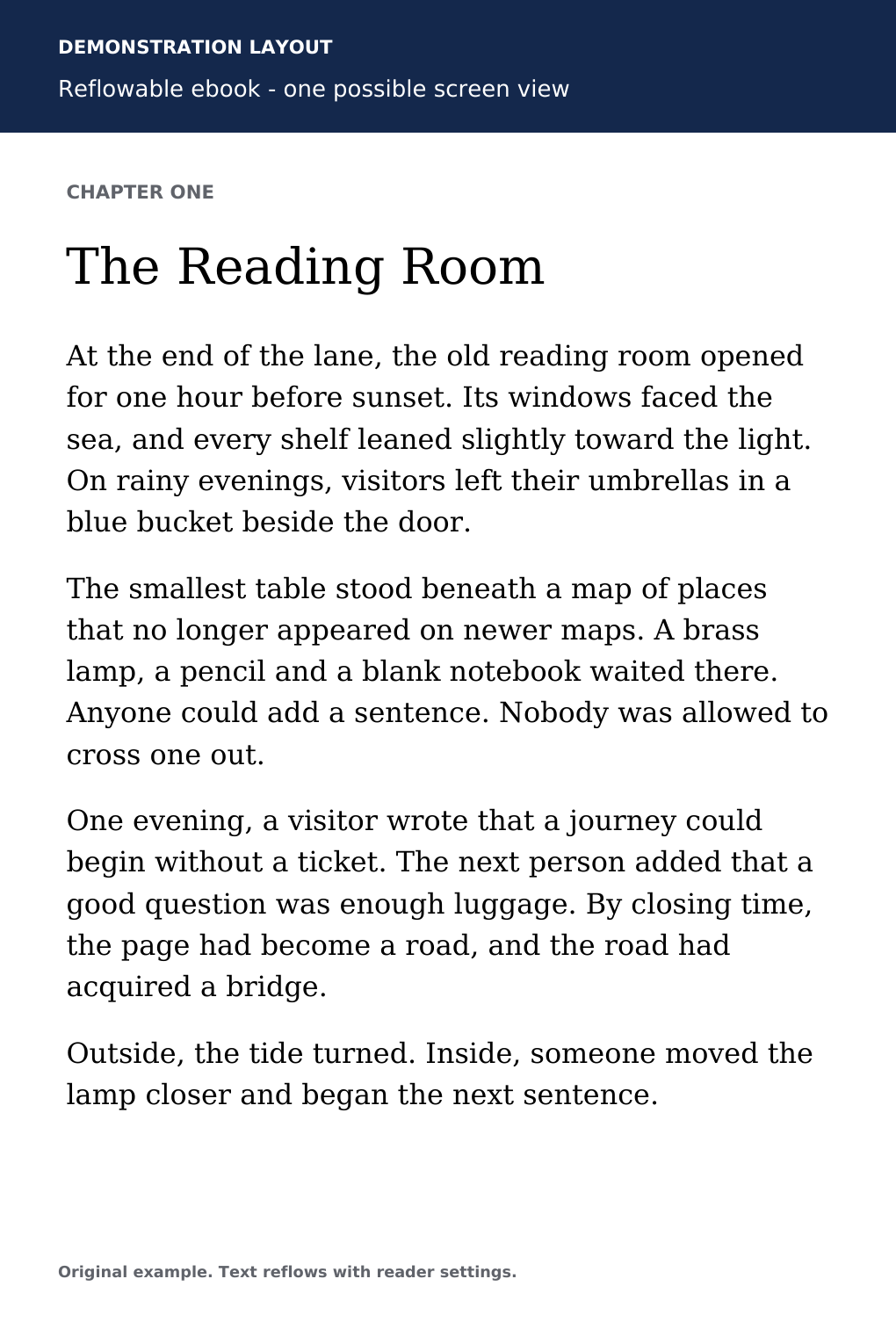
- Chapter opening
- The heading identifies the chapter. In the delivered ebook, chapter navigation must also take the reader here.
- Paragraph rhythm
- These paragraphs use visible space. The delivery check is whether spacing remains sensible as the reader changes text size.
- Page boundary
- The image has an edge. Reflowable text does not have to keep the line endings or page breaks shown here.
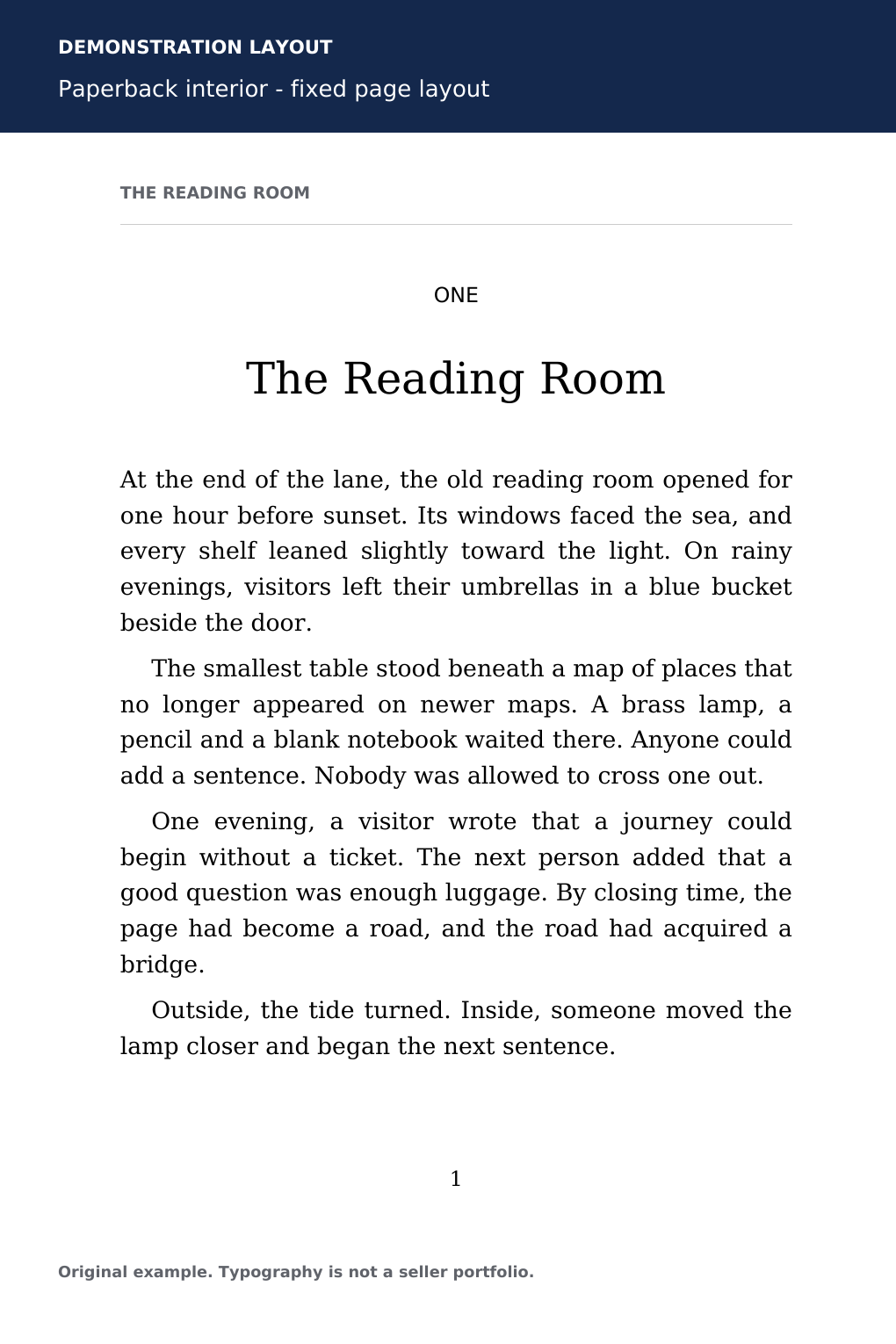
- Chapter opening
- The title, chapter number and white space form a repeatable treatment. Compare it with other openings in the full proof.
- Paragraph rhythm
- Following paragraphs are indented. Look at the first paragraph after a heading or scene break as well as ordinary paragraphs.
- Page boundary
- Text, margins and the page number have fixed positions. Judge them at the intended physical page size.
Both pages use original demonstration prose, “The Reading Room.” A pleasing specimen is the beginning of a conversation; the whole file still needs inspection.
01
Scope
Buy the reading format you actually need.
For a mostly prose novel, memoir or practical guide, begin by discussing a reflowable ebook. Text can move when the reader changes screen or font size. A print PDF is designed around fixed pages. Neither filename alone proves good work, and requesting “Amazon formatting” leaves too much unsaid.
| Your project | Ask to discuss | Evidence to request |
|---|---|---|
| Mostly prose ebook | A reflowable EPUB for named stores | Chapter navigation, text resizing, linked notes where needed |
| Paperback | An interior PDF for the exact printer and specification | Page dimensions, embedded fonts, sequential single pages |
| Both editions | Two separately checked deliverables | A file list and checks for each format |
| Picture book, complex workbook or illustrated reference | A specialist assessment before choosing layout type | A representative difficult page and its behavior in the target reading environment |
KDP accepts EPUB files that meet its publishing guidelines and recommends checking them in Kindle Previewer before upload. EPUB is one accepted option, not the only one. Tell a provider if you also need another store or distributor; agreement on KDP alone does not establish suitability everywhere. KDP’s supported ebook formats.
Cover design, interior formatting, copyediting and publishing administration are separate tasks. One provider may offer several, but each needs an explicit scope. A front-cover image is not a complete paperback cover, and a formatting quote is not automatically a proofreading quote.
02
Preparation
Give the formatter one trustworthy manuscript.
Finish substantive editing before layout. Keep a clearly named master, such as ReadingRoom_manuscript_v03_2026-09-19.docx. Resolve editorial comments and tracked decisions, confirm the chapter order, and list anything intentionally unfinished. If another edit is still coming, say so before asking for a delivery date.
Use consistent heading and paragraph styles instead of making each paragraph look right by hand. Avoid using repeated spaces, tabs or empty paragraphs to push material into place. KDP’s manuscript guide explains paragraph styling, chapter headings, working note links and why manually added page numbers, headers and footers do not belong in a reflowable ebook manuscript. KDP’s ebook manuscript guide.
Make an inventory that includes the ordinary and the awkward: 18 chapters, two appendices, six photographs, one wide table, 24 footnotes and three letters set apart from the body text. Identify poetry, multilingual passages, special symbols and mathematical notation. These details can matter more to effort than total word count.
Supply images separately with descriptive filenames, captions, placement notes and the permissions information you have. For example: “Figure 03, harbour map, after the paragraph beginning ‘At the pier’; caption in manuscript.” Ask the formatter to flag missing material before beginning. Keep the originals and send a working copy.
03
Specification
Make the print brief measurable.
Choose the printer, trim size, ink, paper and bleed setting before approving page design. Trim is the finished page size. Bleed lets artwork reach the trimmed edge. The gutter is the inside margin near the binding. A dense reference book and an airy novella may need different design choices even at the same trim.
Here is a hypothetical specification: “KDP paperback; 6 × 9 inches; black ink on cream paper; no interior bleed; estimated 220 pages; prose with no images.” The no-bleed interior page is 6 × 9 inches. At 220 pages, KDP’s minimum inside margin is 0.5 inch, with outside margins of at least 0.25 inch. Those are production minimums, not a demand to use the smallest possible margins. If the final pagination changes, recheck the requirement. KDP’s trim, bleed and margin guidance.
For comparison, a 6 × 9-inch KDP interior with bleed uses pages measuring 6.125 × 9.25 inches. Do not simply add the same amount to all four sides. Ask the formatter to confirm the setup against the printer’s current instructions. KDP’s bleed examples.
KDP requires a PDF for an interior containing bleed; print interiors use single pages rather than reader spreads. Its submission guidance calls for embedded fonts and images of at least 300 DPI. Request an export made for submission, without crop marks or review annotations. A print cover is a separate file whose spine depends on the finished interior and chosen paper. KDP paperback submission guidelines.
04
Selection
Compare relevant evidence, then the boundaries.
Shortlist providers whose actual interior samples resemble your content. A beautiful illustrated cookbook says little about managing a scholarly book’s notes. Ask for a chapter opening, an ordinary text page and a difficult page. A cover-only portfolio leaves the interior question unanswered.
Look beyond ornament. Are heading levels distinguishable? Do long titles fit? Are captions easy to associate with their images? Does a table remain readable? Ask what the seller personally prepares, which software the source uses, and what the buyer receives. Editable source is useful only if you can access the necessary software, fonts and linked assets.
Send the same inventory to each candidate. Compare the total scope: formats, complexity, sample approval, revision rounds, delivery window, source files and later correction terms. Record unanswered questions instead of treating them as included. A low headline figure attached to a smaller job is not a like-for-like quote.
Fiverr’s Book Design category is one place to browse providers. This is an ordinary, noncommissioned link. No seller is endorsed or represented as tested here. You choose, pay and work with your provider through the merchant’s process; Nerdra does not receive your manuscript or manage the order.
05
Agreement
Define “revision” before the first proof.
Ask for a small design sample before full layout: a chapter opening, a typical spread and your hardest content. Agree whether that sample is included or separately quoted. Approve the treatment in writing so the formatter has a stable direction for the rest of the book.
Separate three kinds of change. A production correction fixes delivery that differs from the approved brief, such as a missing caption. A design revision changes a preference, such as heading size. An author alteration changes the manuscript, such as adding 800 words. Ask how each is handled, how many rounds are included, and whether a round means one consolidated list.
A concrete question works better than “Are revisions included?” Try: “If I supply one numbered correction list within your review window, which items are covered? What would a new chapter cost, and would it change the schedule?” Get the answer before ordering. Confirm the review deadline and who handles corrections discovered in the publishing preview or physical proof.
Agree what happens if the page count changes enough to affect the cover. If the cover designer is a different person, identify who sends the final dimensions. Keep a written delivery list and one named person responsible for approving changes.
06
Inspection
Read the proof as a reader. Check it as a producer.
First match the delivery against the agreed filenames and formats. Open every file. Confirm title, author credit, chapter order, front matter and back matter against the master. Inspect the beginning, middle and end, then check every special element from your inventory. Sampling ordinary pages is helpful; it does not excuse skipping a lone complicated table.
For the ebook, use the actual delivered file. Change text size, try the available device views, follow the contents entries and test note links in both directions. Look for stranded headings, missing characters and images that crowd out nearby text. Screenshots from the provider cannot establish that those interactions work.
For print, review the PDF at its intended size and the printer’s upload preview. Check running headings, numbering, blank pages, chapter starts and text near the binding. Arrange a physical proof before release so you can judge small type, paper and printed image contrast. Screen approval and print approval answer different questions.
Record each issue with the file version, page or chapter, exact location and requested change. “PDF v2, printed page 47, second paragraph: restore the italic title ‘Sea Roads’” is actionable. “The middle looks strange” is not. After revision, check every reported fix and nearby pages for new breaks.
07
Handover
Keep a book you can maintain.
Archive the final manuscript, approved publication files, source files promised in the order, asset permissions, specification and correction history together. Label the actual approved version clearly. Ask which file should be edited when you later update the book, and keep a separate unchanged archive copy.
A technically accepted upload does not prove every sentence or design choice is correct. A formatter also cannot guarantee sales or platform acceptance. Your best next step is concrete: complete the inventory below, adapt the copy-ready brief, then compare written responses before placing an order. Use the acceptance sheet again when delivery arrives.
Platform sources checked 19 September 2026. Recheck the linked requirements when your specification or publishing platform changes.